Your app says “payment successful.” Did your customer actually get in?

We test your app's whole payment path like a real customer would.

Leak Check: $49, report in 24h

Leak Check: order today, report by Wed Oct 7, 9 AM ET

Get a Rescue check: $199, report in 24h Free: the 7-point Paid-Path Checklist

No code access. No logins. No real money.

Sample report · our own demo app (deliberately broken on checks 4 and 7)
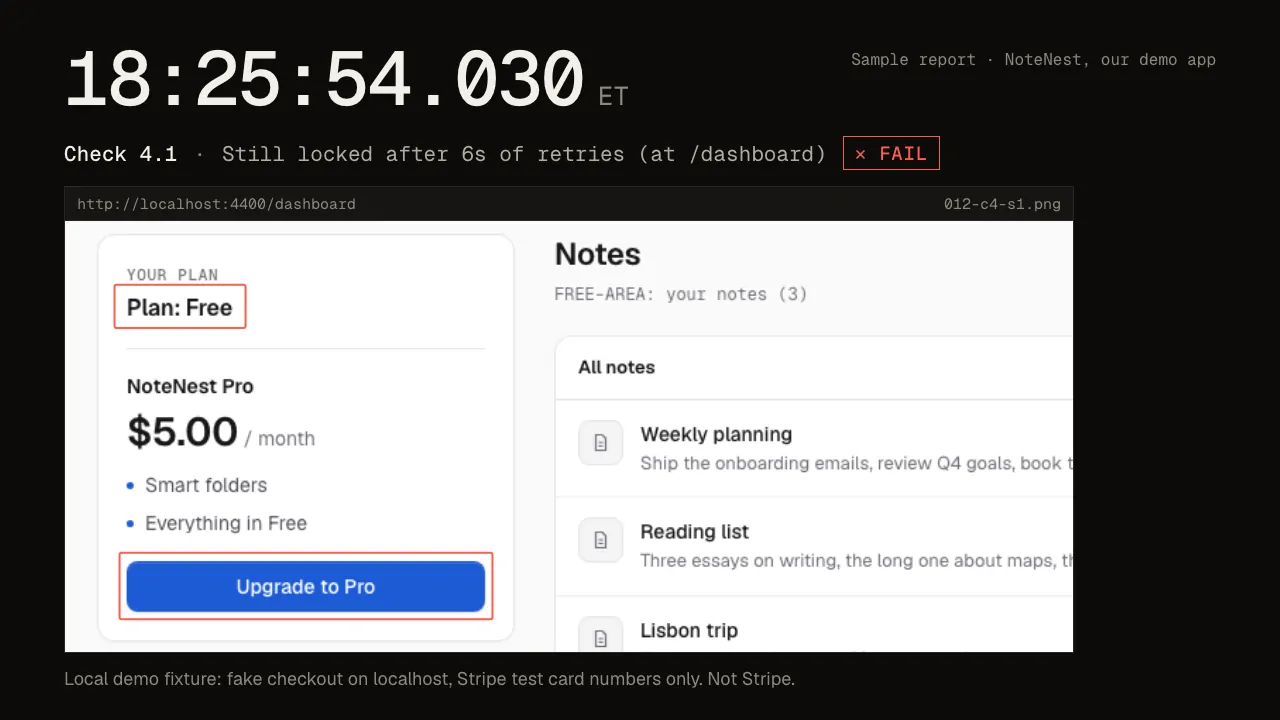
Still from our sample run: after paying, our own demo app is still on the free plan. Check 4.1, 18:25:54 ET, FAIL.
The sample run, 18:25:46 → 18:25:54 ET: real screenshots of our own demo app, deliberately broken.

Sample report

See exactly what you get: a real report from our own demo app, with two failures and their fixes.

  1. Sample report · our own demo app (deliberately broken on checks 4 and 7).
  2. 18:25:47 ET, check 2.4: Pay with test card 4242 4242 4242 4242. Returned to the app at /success.
  3. 18:25:54 ET, check 4.1: Look for paid access after paying. Still locked after 6s of retries (at /dashboard).
  4. 18:25:54 ET, check 4.2: Reload. Locked after reload.
  5. 18:25:54 ET, check 4.3: Log out, log back in, check again. Locked after a fresh login (at /dashboard).
  6. Check 04 result: Fail. Charged but still locked: the payment went through, but the paid features did not unlock.
  7. Fix prompt for check 04: A customer paid successfully in Stripe but the paid features stayed locked ('charged but still locked'). Unlock access only from a server-side source of truth: handle the Stripe webhook events checkout.session.completed and customer.subscription.updated, verify the webhook signature, look the user up by client_reference_id (not by email alone), and save their subscription status and current_period_end. On every page load, read access from that saved status on the server. After the change, a paying user must see paid features after a refresh and after logging out and back in. Find the files that create the Stripe checkout, handle Stripe webhooks, and guard paid routes. Make the smallest change that fixes this, enforce it server-side, and add a short test for it.
  8. Run ends 18:25:54 ET: 4 passed · 2 failed · 1 not run.

Sample report · our own demo app (deliberately broken on checks 4 and 7)

Check 02 · Pay with test card 4242 4242 4242 4242 · our demo app's checkout, captured separately from the run
Our demo app's checkout with the test card filled in (captured separately from the run).
18:25:47.562 ET Check 2.4 · Returned to the app at /success
Our demo app after the test payment: “Returned to the app at /success”.
18:25:54.030 ET Check 4.1 · Still locked after 6s of retries (at /dashboard)

Paid.

Our demo app after the test payment: “Returned to the app at /success”.
✕ Fail · Check 04

Locked.

Our demo app after paying: still on the free plan. “Still locked after 6s of retries (at /dashboard)”.

Fix prompt · check 04

A customer paid successfully in Stripe but the paid features stayed locked ('charged but still locked'). Unlock access only from a server-side source of truth: handle the Stripe webhook events checkout.session.completed and customer.subscription.updated, verify the webhook signature, look the user up by client_reference_id (not by email alone), and save their subscription status and current_period_end. On every page load, read access from that saved status on the server. After the change, a paying user must see paid features after a refresh and after logging out and back in. Find the files that create the Stripe checkout, handle Stripe webhooks, and guard paid routes. Make the smallest change that fixes this, enforce it server-side, and add a short test for it.

18:25:54.654 ET · 4 passed · 2 failed · 1 not run

  1. 01Sign up· Pending✓ Pass
  2. 02Successful payment· Pending✓ Pass
  3. 03Declined card· Pending✓ Pass
  4. 04Paid features unlock· Pending✕ Fail
  5. 05Cancel online· Pending✓ Pass
  6. 06Access ends· Pending– Not run
  7. 07No free way in· Pending✕ Fail
See the full sample report

Local demo fixture: fake checkout on localhost, Stripe test card numbers only. Not Stripe.

How it works

  1. 01

    Tell us your app's URL

  2. 02

    We run the 7 checks

  3. 03

    You get a report

Pricing

Three ways to get checked

Rescue

$199 one-time · 24h report

Charged but still locked? Something's off after you went live?

  • Report and fix prompts within 24 hours.
  • All 7 checks, screenshot evidence, a fix prompt per failure.
  • Full refund if we can't run the core checks or miss the window.
Get a Rescue check

Launch week: order today, report by Wed Oct 7, 9 AM ET

Pre-Launch Check

$129 one-time · 48h report

About to switch on payments?

  • Report and fix prompts within 48 hours.
  • Same 7 checks, before your first real customer finds the problem.
Book a Pre-Launch Check

Launch week: order today, report by Thu Oct 8, 9 AM ET

Leak Check

$49 one-time · 24h report

Just want to know if your paywall leaks?

  • Checks 04 and 07 only: paid features unlock after paying (including after a refresh and a fresh login), and there's no free way into paid pages.
  • Report within 24 hours: pass/fail, screenshots, a fix prompt per failure.
  • Upgrade within 7 days and the $49 counts toward Rescue.
Get a Leak Check

Launch week: order today, report by Wed Oct 7, 9 AM ET

Founding customers (first 8 orders): one free re-run of the failed checks after you apply the fixes.

Last orders this week: Fri 9 Oct, 2:00 PM ET.

Launch week: orders placed before Tue 6 Oct, 9:00 AM ET start their 24h/48h delivery clock at 9:00 AM ET on Tue 6 Oct.

Who's behind it

Mason Capalongo

Built and run by Mason Capalongo, an entrepreneurship student in New York. Every report is reviewed by me before it's sent.